Your Mac day, in tally marks.
Tally keeps an honest ledger of where your Mac time goes: the app in front while you’re actually there, and the websites you spend it on. Four strokes and a fifth across — one glance and you know where the day went.
Pay once · macOS 14+ · Apple silicon & Intel · No account · History stays on your Mac · Already bought? Download Tally
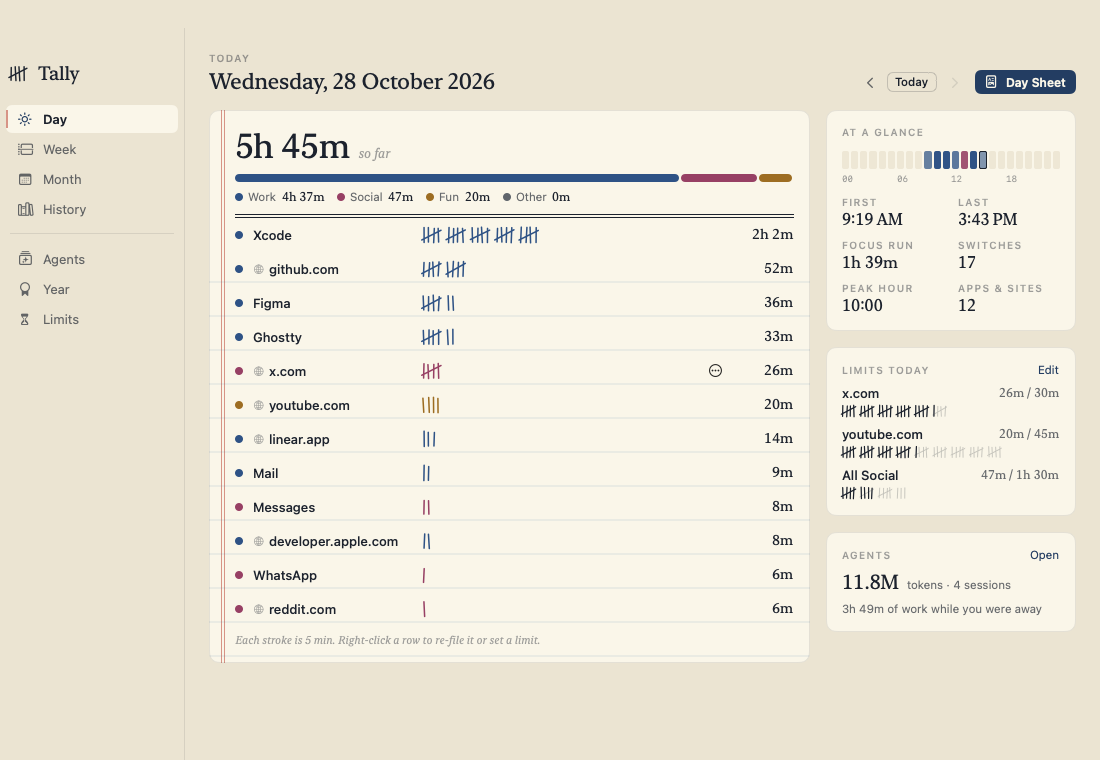
A working model, not a video — sample data. The page can’t see your Mac; the real app starts its ledger the first time it opens. In Tally these shortcuts take ⌘.
- Pay once, no subscription
- No account, no cloud
- No Accessibility or Screen Recording
- Limits nudge, never block
- 14-day refund
An honest ledger, kept by hand.
Every app and website becomes a row of tally marks, filed under Work, Social, Fun or Other. Nothing to set up before the first stroke goes down.
Counts only when you’re there
The app in front, while you’re using it. Walking away, sleep, the lock screen and switching users are struck off; a video playing still counts.
Websites, not just “Safari”
Turn on Safari, Chrome, Arc, Brave or Edge and Tally splits browser time into sites. It keeps the site name only — github.com, never the page.
The ledger
Each stroke is a stretch of time, five make a gate. Busy rows look busy, so a glance tells you more than a pie chart ever did.
Day, Week, Month and History
Go back to any day since the first, with search. History is kept forever — a year of it is a few megabytes in one file on your Mac.
Your own filing
Work, Social, Fun and Other, with sensible defaults for common apps and sites. Re-file anything in one click; it applies to every day.
Limits that nudge, never lock
“30 minutes on x.com.” A heads-up at 80%, then a small “Time’s up” card with “5 more minutes”. Nothing is ever blocked.
The evening day sheet
At a time you choose, the day becomes a 1080 × 1350 image you can save or share — with app names, or only the categories.
The year sheet
Total hours, longest day, top five, peak hour and longest focus run. Preview it any time; in December the year is ready to keep.
AI agents next to your time
Claude Code and Codex sessions, tokens, and how long they worked while you were away. Off until you turn it on, and read-only.
Ask Tally from Claude, Codex or Cursor
A read-only MCP server: “How long was I on YouTube this week?” Your AI tool gets numbers for today, any day, top apps, hours and limits.
Export any time
Every stretch of time or daily totals as CSV, or everything as JSON. It’s your history; take it anywhere.
In your menu bar
Today’s marks and total at the top of your screen, your top five a click away, and Pause for when you’d rather not be counted.
Comparing screen time apps? Read the guide: the best screen time apps for Mac
No keylogging. No screenshots. No guessing.
Tally listens for the app in front changing and checks your idle time every five seconds. After three quiet minutes (you can choose) it stops counting until you’re back.
For each stretch it keeps the start, the end, the app and — in a browser you’ve turned on — the site name. Never full addresses, page titles, window contents or keystrokes.
How much of today was actually work, and when did my agents run without me?
tally · today_summary · agent_usageYou’ve been at your Mac 5h 45m today — 4h 38m of it Work, mostly Xcode (2h 2m) and github.com (52m). Your agents worked 7h 3m across 4 sessions, 3h 49m of it while you were away.
Claude can ask where the time went.
Tally includes a read-only MCP server. Add it to Claude Code, Claude Desktop, Codex or Cursor and they can ask about today, any day, top apps and sites, hour by hour, limits and agent usage.
claude mcp add tally -- "/Applications/Tally.app/Contents/MacOS/Tally" --mcp
It answers with numbers and can’t change anything. What your AI tool does with those numbers is up to that tool.
Every page of the ledger, light and dark.
Screenshots straight from Tally, with sample data. Flip between light and dark.


What stays. What connects.
A record of your day is personal. Tally keeps all of it in one file on your Mac.
Stays on your Mac
Your history, and everything Tally works out from it.
- ✓Your time historyOne SQLite file in
~/Library/Application Support/Tally, kept until you delete it - ✓The websites you visitSite names only, never full addresses or page titles
- ✓AI agent usageNumbers read from Claude Code and Codex logs, if you turn it on; prompts, replies and code are skipped
- ✓Day and year sheetsSaved as images on your Mac; shared only when you share them
- ✓How you use itNo account, no sync, no analytics in the app
Connects
Two small requests over HTTPS, plus one you set up yourself.
- 1License checkYour key and an activation ID, to Dodo Payments
- 2Update checkApp name and version, to
tally.newmac.app - 3Your AI tool, if you add Tally to itThe MCP server runs on your Mac; what Claude, Codex or Cursor asks for becomes part of that conversation
The full list, for every app, is in the privacy policy.
Pay once. Keep it.
One payment, no subscription. Choose how many Macs you’ll use Tally on.
3 Macs
For your home and work Macs
Checkout opens soon. The buttons above go live here the moment it does.
Every plan includes
- One payment, no subscriptionEvery feature, yours to keep.
- License key by emailSent the moment you pay. Activate in one click.
- Move between MacsUse “Deactivate this Mac”, then activate on the new one.
- Free updatesNew versions install themselves.
- 14-day refundNot for you? Read the refund policy.
- macOS 14 or laterNative on Apple silicon & Intel.
Already bought? Download Tally · .zip · Install help
Questions, answered.
Which permissions does Tally ask for?
None to count apps — idle time comes from the system’s input timer, so Tally doesn’t need Accessibility or Screen Recording. If you turn on websites for a browser, macOS asks once whether Tally may control that browser (Automation), because that’s how Tally reads the current tab’s address. Notifications are asked for when you set your first limit.
What does Tally record?
For each stretch of time: when it started and ended, the app, and — in a browser you’ve turned on — the site name, like github.com. Never full addresses, page titles, window contents, keystrokes or screenshots.
What about private and incognito windows?
In Chrome, Arc, Brave and Edge they’re never recorded: those browsers say which windows are incognito, and Tally skips them. Safari doesn’t tell other apps which windows are private — finding out would take Accessibility access, which Tally doesn’t ask for — so Tally can’t skip them there. Pause Tally from the menu bar before browsing privately in Safari, or leave Safari off in Settings › Websites.
Does anything leave my Mac?
No. The history is one SQLite file in your Library folder. There’s no account and no sync. The only network use is license activation and update checks. If you add Tally’s MCP server to an AI tool, the numbers that tool asks for become part of your conversation with it.
How does the AI agents page work?
It’s off until you turn it on. Tally then reads the usage numbers Claude Code (~/.claude/projects) and Codex (~/.codex/sessions) already keep: times, token counts, model names and the project folder’s name. It never reads your prompts, replies or code, and never changes those files. Cursor doesn’t keep token counts on disk, so it isn’t included.
Will limits block apps or websites?
No. Tally notifies you at 80% and when time’s up, and can show a small card with “5 more minutes”; it closes with one click and nothing is blocked. If you want hard blocking, Tally isn’t that app.
Can it show my Screen Time history from before I installed it?
No. Tally doesn’t read Apple’s Screen Time data; its ledger starts the first time you open it, and from then on it keeps every day. The AI agents page can show earlier days, as far back as Claude Code’s and Codex’s own logs go.
Does it slow my Mac down?
No. Tally reacts to app switches as they happen and checks idle time every five seconds; a year of history is a few megabytes.
What doesn’t it do?
No iPhone or iPad data, no team dashboards, no cloud sync, no hard blocking, no keystroke or screen capture. For what your Mac does overnight — sleep, wakes and battery — see our app Nightwatch.
macOS says it can’t verify the developer.
Tally is distributed directly from this website. Here’s how to open it the first time.
Is there a free trial?
No. Use the working model at the top of this page to see exactly how Tally works. If it turns out not to be for you, you can ask for a refund within 14 days — see the refund policy.
Can I use Tally on more than one Mac?
Yes. The 3-Mac and 5-Mac plans cover several Macs with one license key. Each Mac keeps its own ledger — there’s no sync. Any license can move to a new Mac: choose “Deactivate this Mac” in Tally on the old one, then activate on the new one.

Start the ledger today.
The first stroke goes down the minute Tally opens. By this evening, you’ll have your first day sheet.